






Error Code 0x800704c7 – What is it?
Error code 0x800704c7 occurs when Windows users attempt to update their system. It affects various Windows users including those using Windows 7, Windows 8, and 8.1 and Windows 10. It usually occurs due to poor maintenance of the system and includes common symptoms such as the following:
- Inability to upgrade your Windows operating system
- Message box with error code 0x800704c7
Solution
 Error Causes
Error code 0x800704c7 in Windows 10 can occur due to several reasons. For instance, it may be due to corrupted or missing system files. It may also result from malicious programs affecting your system or occur when a program or several programs are running in the background of one’s system while the user attempts to run the update.
To correct this issue, Windows users will need to select one or a few methods, depending on the issues affecting their PC.
Further Information and Manual Repair
Some of the best solutions for error code 0x800704c7 available to Windows users including using tools to scan for missing systems files or correct other issues inherent within your system.
These methods may include the use of Command Prompt and the performance of technical repair procedures. If you are uncertain of your skills, avoid compounding the issue or causing further damage to your PC by contacting a skilled Windows repair technician. This IT professional will be best equipped to use Windows tools and other methods to resolve error code 0x800704c7.
Method One: Scan Your System for Missing or Corrupt System Files
Using System File Checker Tool (SFC), Windows users can check their system for missing o corrupt system files. These utility tools within your Windows device will be able to replace missing files and repair corrupted ones, resulting in a more efficient system. Run this tool by following the steps below:
- Step One: Go to Start and type Command Prompt or CMD.
- Step Two: Run as Administrator
- Step Three: Type sfc /scannow. (Be sure to place a space between “sfc” and “/scannow”).
After running these procedures, check if the error code has been resolved. Go to Settings > Update & security > Windows Update. Update your Windows operating system. If error code 0x800704c7 reoccurs, you will need to try the next method below.
Method Two: Restore your System
System Restore is one of the best manual repair solutions Windows users can apply when they come across error codes like error code 0x800704c7. That’s because this method requires no technical or advanced knowledge and therefore can be performed by anyone. Simply follow the steps below to restore your system to a period of time in the past where the error was not present on your system. If done correctly, this could enable you to resolve the issue with little frustration on your part.
- Step one: Type Control Panel in the search bar near the Start button
- Step two: Select Control Panel, then Recovery
- Step three: Select System Restore then click Next
- Step four: Select a restore point before appeared on your Windows 10 system
- Step five: Select Next then Finish
Note that once System Restore is enabled it will remove drivers, apps, and even updates installed after the restore point. For this reason, be careful to choose the most appropriate restore point. Also once you’ve completed this task, check to see if you are able to update your system. If the update stops before the process is complete and a message box occurs with the error code 0x800704c7, proceed to the next manual repair option below.
Method Three: Check for and Remove Malware
Viruses or other forms of malware can adversely affect your system, causing error codes and other issues to take place. To resolve error code 0x800704c7 in Windows 10, check for and remove malware using a reputable anti-malware program.
If no anti-virus software is present on your system or if you scan your device but fail to spot an issue, proceed to method four.
Method Four: Use an Automated Tool
This method involves the use of a powerful automated tool. But why is this important you might ask? A third-party tool is often the best solution when all manual repair efforts fail. Automated tools come equipped to tackle the most serious PC problems including error codes which can cause frustration and result in reduces PC performance.
 Microsoft wants to escalate the situation from Australia to the EU, what a surprise.
Hello all and welcome to another news article, this time we are focusing on Microsoft pushing the EU to accept law proposition from Australia.
For all of you who are not familiar with the given situation let me quickly explain. The feud began when the Australian government proposed a new law that targeted Facebook and Google specifically. The government said that it believed that both of the tech giants were using content from news outlets without paying.
Have you ever seen the little news snippets that Google or Facebook sometimes show its users to keep them up to date? These are lifted directly from news websites, and the Australian government claimed that this practice meant that people didn't bother visiting the news website. This then staved news websites of revenue.
As such, the government put forward a new law that would mean Google and Facebook would have to pay the source website for every time they displayed a news snippet. Facebook responded by removing its Australian news coverage in light of the law.
Google, however, put up a fight. It argued that its snippets encouraged people to click on it to read more, thus driving more traffic to the news website. It also said that such a law would be too expensive to maintain in the long run.
As such, Google threatened to remove itself from Australia if the law passed. This was likely a scare tactic, as 95 percent of Australian web users use Google; however, it actually opened the door for its rival, Microsoft.
Microsoft saw how it could push its own search engine BING to replace google. It of course went and reached the Australian government to assure them that BING is more than capable to fulfill its needs and fully abide by the proposed law.
Now Microsoft knows that if this law passes it could see a similar situation happening in Europe and it is pushing it. US News reported on how Microsoft plans to encourage EU countries to adopt this new law too. The company has teamed up with the European Publishers Council and News Media Europe to make the following statement:
Publishers might not have the economic strength to negotiate fair and balanced agreements with these gatekeeper tech companies, who might otherwise threaten to walk away from negotiations or exit markets entirely
Microsoft wants to escalate the situation from Australia to the EU, what a surprise.
Hello all and welcome to another news article, this time we are focusing on Microsoft pushing the EU to accept law proposition from Australia.
For all of you who are not familiar with the given situation let me quickly explain. The feud began when the Australian government proposed a new law that targeted Facebook and Google specifically. The government said that it believed that both of the tech giants were using content from news outlets without paying.
Have you ever seen the little news snippets that Google or Facebook sometimes show its users to keep them up to date? These are lifted directly from news websites, and the Australian government claimed that this practice meant that people didn't bother visiting the news website. This then staved news websites of revenue.
As such, the government put forward a new law that would mean Google and Facebook would have to pay the source website for every time they displayed a news snippet. Facebook responded by removing its Australian news coverage in light of the law.
Google, however, put up a fight. It argued that its snippets encouraged people to click on it to read more, thus driving more traffic to the news website. It also said that such a law would be too expensive to maintain in the long run.
As such, Google threatened to remove itself from Australia if the law passed. This was likely a scare tactic, as 95 percent of Australian web users use Google; however, it actually opened the door for its rival, Microsoft.
Microsoft saw how it could push its own search engine BING to replace google. It of course went and reached the Australian government to assure them that BING is more than capable to fulfill its needs and fully abide by the proposed law.
Now Microsoft knows that if this law passes it could see a similar situation happening in Europe and it is pushing it. US News reported on how Microsoft plans to encourage EU countries to adopt this new law too. The company has teamed up with the European Publishers Council and News Media Europe to make the following statement:
Publishers might not have the economic strength to negotiate fair and balanced agreements with these gatekeeper tech companies, who might otherwise threaten to walk away from negotiations or exit markets entirely 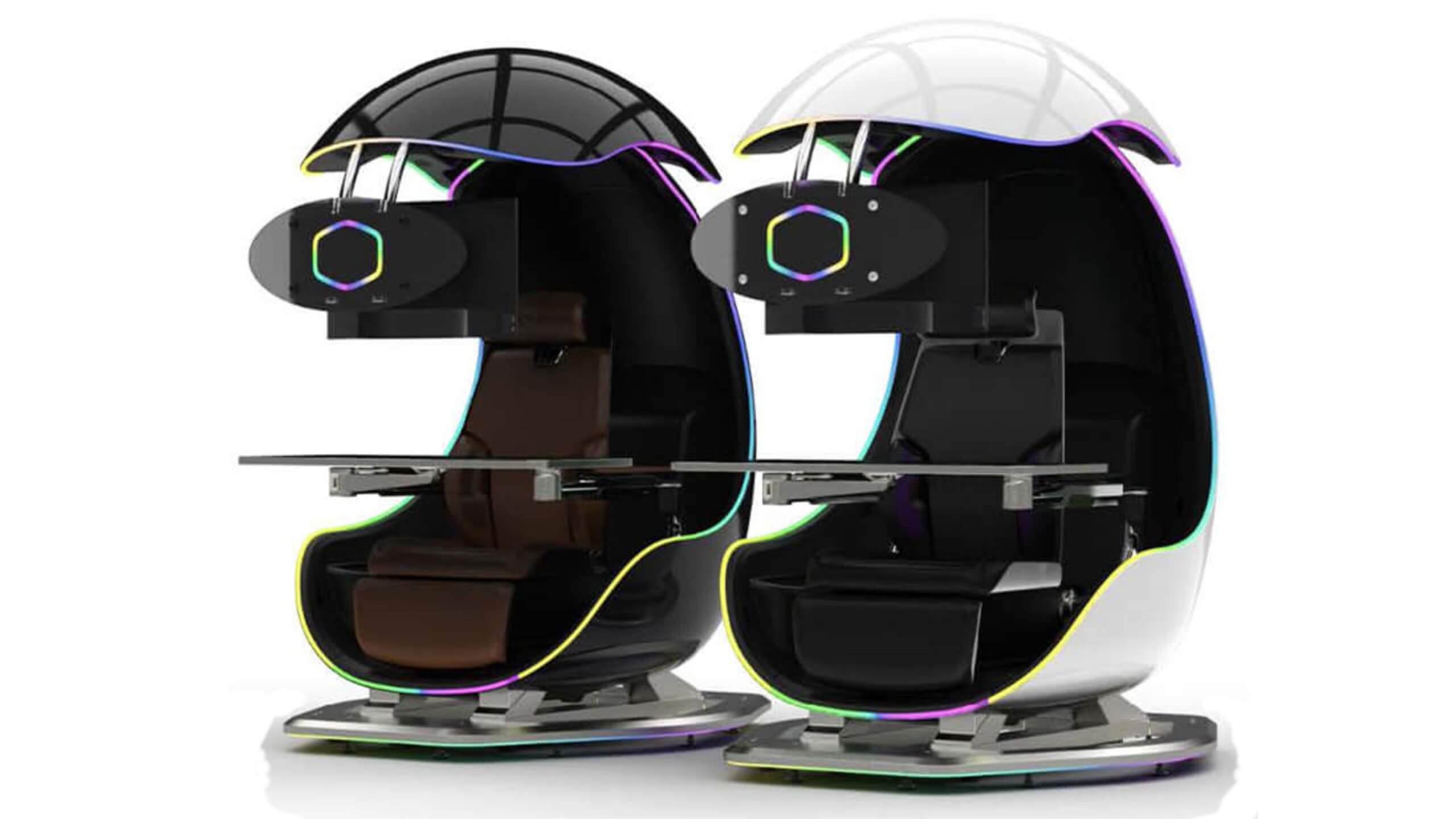 I going to admit right here that I am a big fan of Cooler Master PC cases, I like them and they are always one of the things that I consider when building a new PC, overall I like their ideas and quality so personal for me it was quite a surprise to see that they are one that is making a new generation gaming chair.
Now truth to be told Orb X is not your typical gaming chair as you can clearly see from the pictures. The chair itself will come in two colors: white or black and RGB lighting looks to be prominently featured throughout.
I going to admit right here that I am a big fan of Cooler Master PC cases, I like them and they are always one of the things that I consider when building a new PC, overall I like their ideas and quality so personal for me it was quite a surprise to see that they are one that is making a new generation gaming chair.
Now truth to be told Orb X is not your typical gaming chair as you can clearly see from the pictures. The chair itself will come in two colors: white or black and RGB lighting looks to be prominently featured throughout.
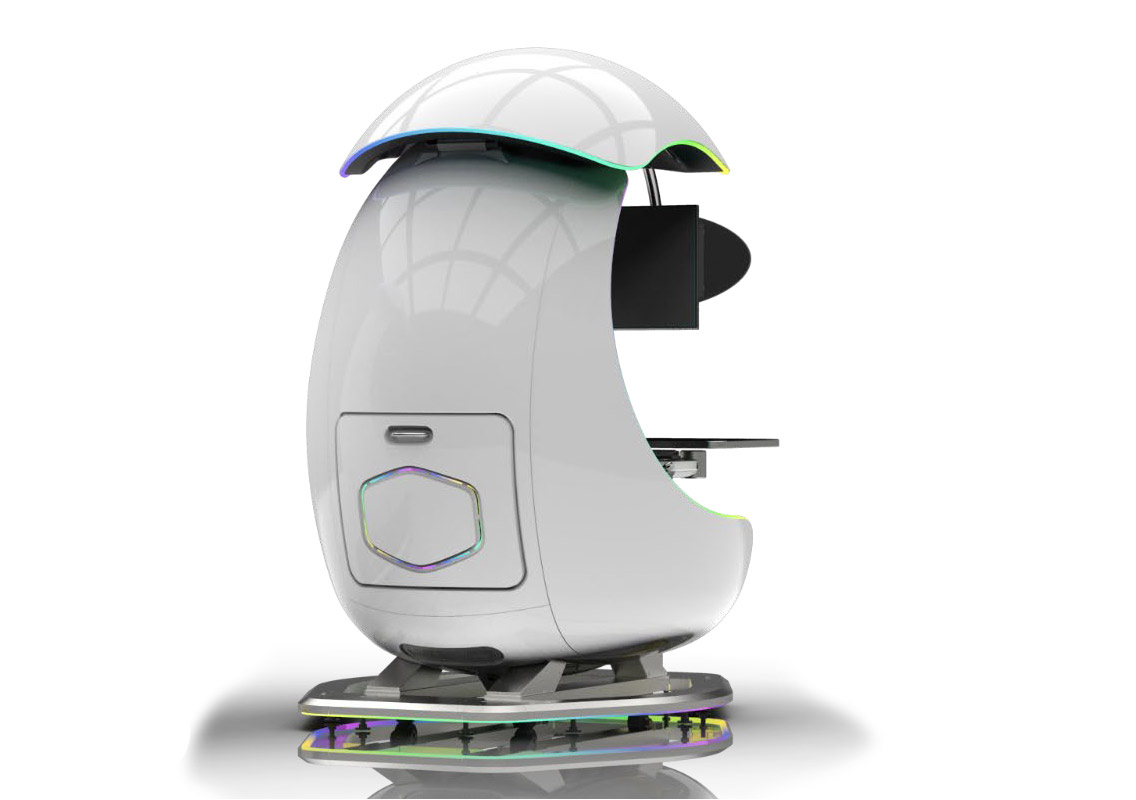 The chair itself is advertised as both meant and aimed for professional and gaming crowds but I believe the gaming crowd is in general more interested in this hardware piece.
Hardware is enclosed in a fully motorized shuttle dome which aims to maximize your privacy, it supports a single 49inch display or three 27inch monitors along with surround speakers if you do not wish to use headphones.
The chair itself is advertised as both meant and aimed for professional and gaming crowds but I believe the gaming crowd is in general more interested in this hardware piece.
Hardware is enclosed in a fully motorized shuttle dome which aims to maximize your privacy, it supports a single 49inch display or three 27inch monitors along with surround speakers if you do not wish to use headphones.
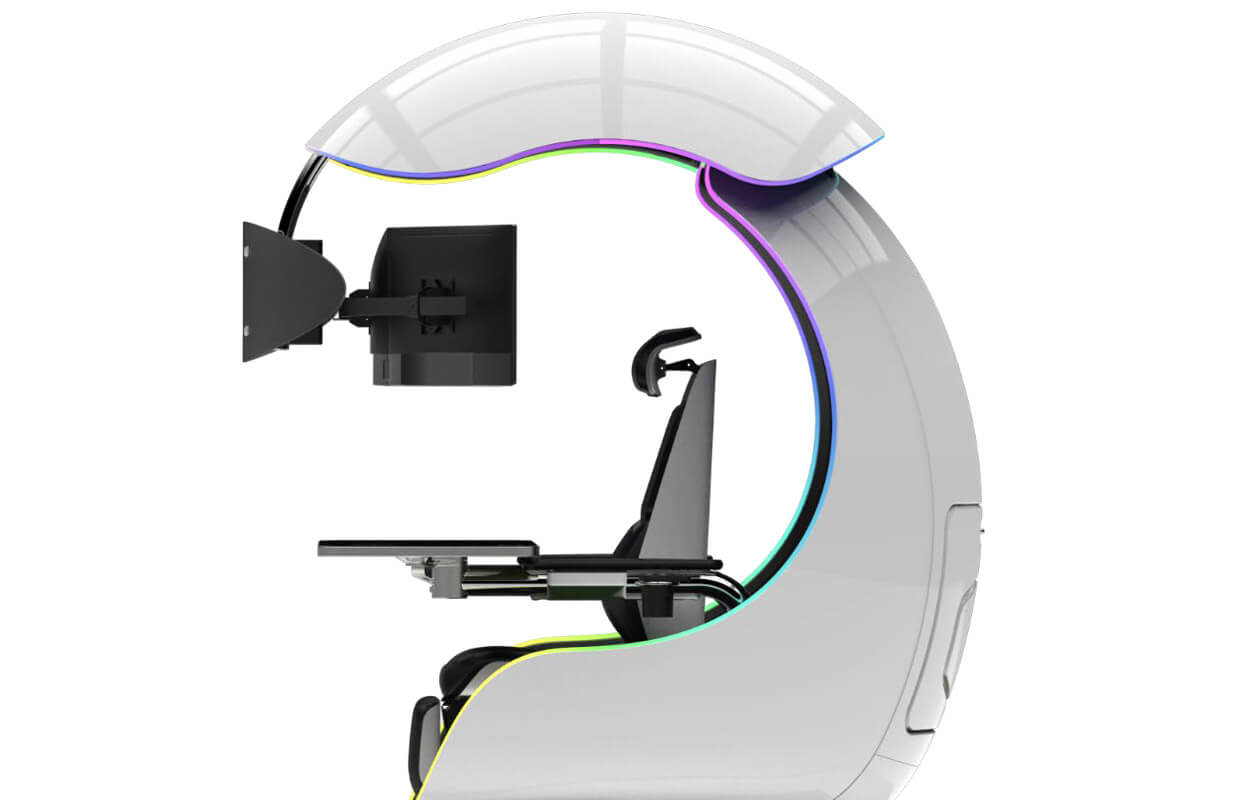 It offers an adjustable headrest, lumbar support, and footrest so you can spend some time in it and be comfortable. Controls on the chair itself allow you to raise or lower the dome for easier getting in and out of it.
Orb X also has a compartment in its backside, it folds out and has a sliding tray designed to hold your PC or console. Everything is enclosed so wiring is not the issue.
Overall Orb X seems really like the computer chair of the future, Cooler Master expects to release the Orb X by December 2021, priced around $12,000-$14,000.
It offers an adjustable headrest, lumbar support, and footrest so you can spend some time in it and be comfortable. Controls on the chair itself allow you to raise or lower the dome for easier getting in and out of it.
Orb X also has a compartment in its backside, it folds out and has a sliding tray designed to hold your PC or console. Everything is enclosed so wiring is not the issue.
Overall Orb X seems really like the computer chair of the future, Cooler Master expects to release the Orb X by December 2021, priced around $12,000-$14,000. 