TranslationBuddy is a browser extension developed by MindSpark Inc. for Google Chrome. This extension allegedly offers users the ability to translate any text to any language.
From the Author: Now enjoy immediate access to the FREE web, email, and text translations, Multilanguage Virtual Keyboards, words of the day, and more!
This extension configures your New Tab page to TranslationBuddy™ to provide these features.
Get FREE translations instantly. An easy way to translate web pages, texts, and emails.
Unfortunately, this extension hijacks your browser's new tab page, and default search engine, changing it to MyWay. While installed, it monitors browser activity such as visited websites, clicked links, downloaded information, and sometimes even personal information that it later uses to display additional unwanted ads in your browser.
About Browser Hijackers
Browser hijacking is a type of unwanted program, usually a web browser add-on or extension, which then causes modifications in the web browser’s settings. Browser hijackers are capable of doing a number of things on your PC. Generally, browser hijacking is used for earning advertising revenue from forced advert clicks and site visits. Though it might appear harmless, these tools are made by vicious people who always try to take advantage of you, so that hackers can earn money from your naivety and distraction. Some browser hijackers are designed to make particular modifications beyond the browsers, like altering entries in the system registry and letting other malware further damage your machine.
Indications of browser hijack
There are several symptoms that point to a browser hijacking: you see unauthorized modifications to your Internet browser’s home page; bookmark and the new tab are likewise modified; The default search page of browser is modified; unwanted new toolbars are added to your web browser; unstoppable flurries of popup advertisements appear on your computer screen; your web browser gets sluggish, buggy, crashes very often; you’re blocked to access the websites of computer security solution providers.
Exactly how they invade computer systems
Browser hijackers can enter a PC by some means or other, for example via file sharing, downloads, and email also. They may also come from any BHO, browser extension, toolbar, add-on or plug-in with malicious intent. Some internet browser hijackers spread in user’s computers using a deceptive software distribution strategy called “bundling” (commonly through shareware and freeware).
Browser hijacking may lead to severe privacy problems and even identity theft, affect your web browsing experience by taking control over outbound traffic, substantially slows down your computer or laptop by deleting lots of resources, and cause system instability at the same time.
Removing browser hijackers
Some hijackers could be removed by deleting the free software they came with or by deleting any add-ons you’ve recently added to your computer system. Having said that, many hijackers are extremely tenacious and require specialized applications to remove them. Inexperienced PC users shouldn’t ever attempt the manual form of removal, as it demands thorough system knowledge to perform fixes on the system registry and HOSTS file.
You might opt for automatic browser hijacker removal methods by simply installing and running an efficient anti-malware program. One of the recommended tools for fixing browser hijacker infections is SafeBytes Anti-Malware. It will help you remove any pre-existing malicious software in your system and provides you real-time monitoring and protection from the latest internet threats. Together with the anti-malware tool, a system optimizer could help you in deleting all associated files and modifications in the registry automatically.
How To Get Remove Virus That Is Preventing Anti-Malware Downloads?
Malware can cause all kinds of damage when they invade your system, from stealing sensitive details to deleting data files on your PC. Certain malware variants modify browser settings by adding a proxy server or modify the computer’s DNS configurations. In these cases, you’ll be unable to visit certain or all websites, and thus unable to download or install the required security software to eliminate the malware. If you are reading this article now, you might have perhaps realized that virus infection is the reason behind your blocked net connectivity. So how to proceed if you want to download and install an antivirus program such as Safebytes? Refer to the instructions below to remove malware through alternative ways.
Install the antivirus in Safe Mode
In Safe Mode, you are able to modify Windows settings, uninstall or install some programs, and eliminate hard-to-delete viruses. In the event, the malicious software is set to load automatically when the PC starts, switching to this mode may prevent it from doing so. In order to get into Safe Mode or Safe Mode with Networking, press F8 while the system is booting up or run MSConfig and look for the “Safe Boot” options under the “Boot” tab. Once you’re in safe mode, you can try to install your anti-malware software application without the hindrance of the malware. After installation, run the malware scanner to eliminate most standard infections.
Switch to an alternate internet browser
Malicious code may exploit vulnerabilities on a particular internet browser and block access to all antivirus software sites. If you seem to have a virus attached to Internet Explorer, then switch over to an alternate browser with built-in safety features, such as Firefox or Chrome, to download your preferred anti-malware program – Safebytes.
Make a bootable USB anti-virus drive
Another approach is to download and transfer an anti-malware application from a clean PC to run a scan on the infected computer. Adopt these measures to run the antivirus on the affected computer system.
1) On a virus-free PC, download and install Safebytes Anti-Malware.
2) Plug the Flash drive into the clean computer.
3) Double-click the Setup icon of the antivirus software to run the Installation Wizard.
4) Select the USB flash drive as the location for saving the file. Follow the directions to complete the installation process.
5) Disconnect the pen drive. Now you can use this portable anti-malware on the infected computer system.
6) Double-click the EXE file to run the Safebytes tool from the pen drive.
7) Hit the “Scan” button to run a full system scan and remove malware automatically.
Let's Talk About SafeBytes Security Suite!
Today an anti-malware program can protect your computer from various kinds of internet threats. But wait, how to choose the right one amongst the many malware protection software that’s available out there? As you might be aware, there are numerous anti-malware companies and tools for you to consider. A few of them do a good job in getting rid of malware threats while some will damage your PC themselves. You need to be careful not to choose the wrong product, especially if you purchase a premium program. Among few good programs, SafeBytes Anti-Malware is the highly recommended software program for the security-conscious individual.
SafeBytes anti-malware is really a powerful, very effective protection application made to assist users of all levels of computer literacy in finding and removing malicious threats out of their PC. Using its cutting-edge technology, this application can assist you to eliminate several types of malware which include viruses, worms, PUPs, trojans, adware, ransomware, and browser hijackers.
SafeBytes anti-malware takes computer protection to a totally new level with its enhanced features. Below are some typical features found in this software:
Real-time Threat Response: SafeBytes provides complete and real-time security for your laptop or computer. This utility will constantly monitor your computer for any suspicious activity and updates itself continuously to keep abreast of the newest threats.
Anti-Malware Protection: This deep-cleaning anti-malware program goes much deeper than most antivirus tools to clean out your personal computer. Its critically acclaimed virus engine finds and disables hard to remove malware that hides deep inside your computer.
“Fast Scan” Features: SafeBytes Anti-Malware has a multi-thread scan algorithm that works up to 5 times faster than any other protection software.
Web Protection: Safebytes allots all websites a unique safety ranking that helps you to have an idea of whether the website you are about to visit is safe to browse or known to be a phishing site.
Light-weight: SafeBytes provides total protection from online threats at a fraction of the CPU load because of its enhanced detection engine and algorithms.
24/7 Online Support: You could get high levels of support around the clock if you’re using their paid software.
To sum it up, SafeBytes Anti-Malware offers great protection combined with very low system resource usage with both great malware prevention and detection. Now you may know that this tool does more than just scan and remove threats from your PC. So if you are looking for the best anti-malware subscription for your Windows-based PC, we suggest SafeBytes Anti-Malware software.
Technical Details and Manual Removal (Advanced Users)
If you wish to carry out the removal of TranslationBuddy manually rather than using an automated software tool, you may follow these steps: Proceed to the Windows Control Panel, click on the “Add/Remove Programs” and there, select the offending application to uninstall. In case of suspicious versions of web browser plugins, you can easily get rid of them via your web browser’s extension manager. Additionally, it is recommended to factory reset your browser to its default condition to fix corrupt settings.
To ensure the complete removal, manually examine your hard drive and registry for all of the following and eliminate or reset the values accordingly. But bear in mind, this is often a challenging task and only computer professionals could carry it out safely. Furthermore, certain malware is capable of replicating or preventing deletion. It is recommended that you carry out the removal process in Windows Safe Mode.
Files:
%PROGRAMFILES(x86)%\TranslationBuddy_5eEI952%PROGRAMFILES%\TranslationBuddy_5eEI943
%UserProfile%\Local Settings\Application Data\Google\Chrome\UserData\Default\Extensions\pdokjdabepficcifddlfndkildpcgdne934
%LOCALAPPDATA%\Google\Chrome\User Data\Default\Extensions\pdokjdabepficcifddlfndkildpcgdne925chrome-extension_pdokjdabepficcifddlfndkildpcgdne_0.localstorage746chrome-extension_pdokjdabepficcifddlfndkildpcgdne_0.localstorage-journal737http_translationbuddy.dl.tb.ask.com_0.localstorage-journal728http_translationbuddy.dl.tb.ask.com_0.localstorage719translationbuddy.dl.tb.ask1.xml7010
%UserProfile%\Local Settings\Application Data\Translation BuddyTooltab1311%LOCALAPPDATA%\Translation BuddyTooltab12
Registry:
HKEY_CURRENT_USER\Software\TranslationBuddy_5e
HKEY_LOCAL_MACHINE\SOFTWARE\Microsoft\Windows\CurrentVersion\Run, value: TranslationBuddy AppIntegrator 32-bit
HKEY_LOCAL_MACHINE\SOFTWARE\Microsoft\Windows\CurrentVersion\Run, value: TranslationBuddy AppIntegrator 64-bit
HKEY_LOCAL_MACHINE\SOFTWARE\Microsoft\Windows\CurrentVersion\Run, value: TranslationBuddy EPM Support
HKEY_LOCAL_MACHINE\SOFTWARE\Microsoft\Windows\CurrentVersion\Run, value: TranslationBuddy Search Scope Monitor
HKEY_LOCAL_MACHINE\SOFTWARE\Wow6432Node\Microsoft\Internet Explorer\Toolbar, value: a3c5f699-f046-47e7-8011-06269bc6ed24
HKEY_LOCAL_MACHINE\SOFTWARE\Microsoft\Internet Explorer\Toolbar, value: a3c5f699-f046-47e7-8011-06269bc6ed24
HKEY_LOCAL_MACHINE\SOFTWARE\Wow6432Node\Microsoft\Windows\CurrentVersion\Run, value: TranslationBuddy EPM Support
HKEY_LOCAL_MACHINE\SOFTWARE\Wow6432Node\Microsoft\Windows\CurrentVersion\Run, value: TranslationBuddy Search Scope Monitor
HKEY_LOCAL_MACHINE\SYSTEM\CurrentControlSet\services\TranslationBuddy_5eService
HKEY_LOCAL_MACHINE\SYSTEM\ControlSet001\services\TranslationBuddy_5eService
HKEY_LOCAL_MACHINE\SYSTEM\ControlSet002\services\TranslationBuddy_5eService
HKEY_CURRENT_USER\Software\AppDataLow\Software\TranslationBuddy_5e
HKEY_LOCAL_MACHINE\SOFTWARE\Wow6432NodeTranslation Buddy
HKEY_LOCAL_MACHINE\SOFTWARE\Translation Buddy
HKEY_CURRENT_USER\Software\Microsoft\Internet Explorer\DOMStorage\translationbuddy.dl.myway.com
HKEY_CURRENT_USER\Software\Microsoft\Internet Explorer\DOMStorage\translationbuddy.dl.tb.ask.com
HKEY_LOCAL_MACHINE\Software\APPLICATION\Microsoft\Windows\CurrentVersion\Uninstall..Uninstaller
Translation BuddyTooltab Uninstall Internet Explorer







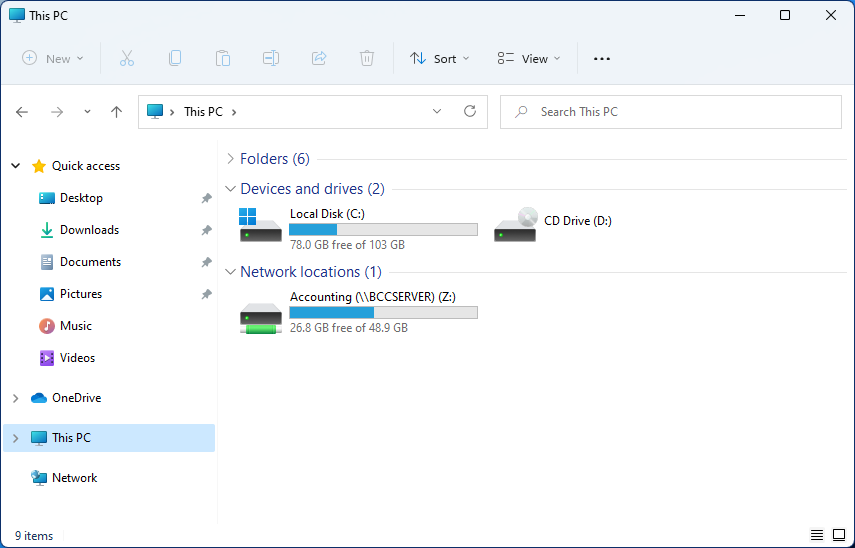 Mapping network drive has many benefits in terms of speed and ease of access of files via network. It lets you access the hard drive over the whole network like it was the hard drive inside your PC case. In order to easily and quickly map a folder as a network drive follow the guide below.

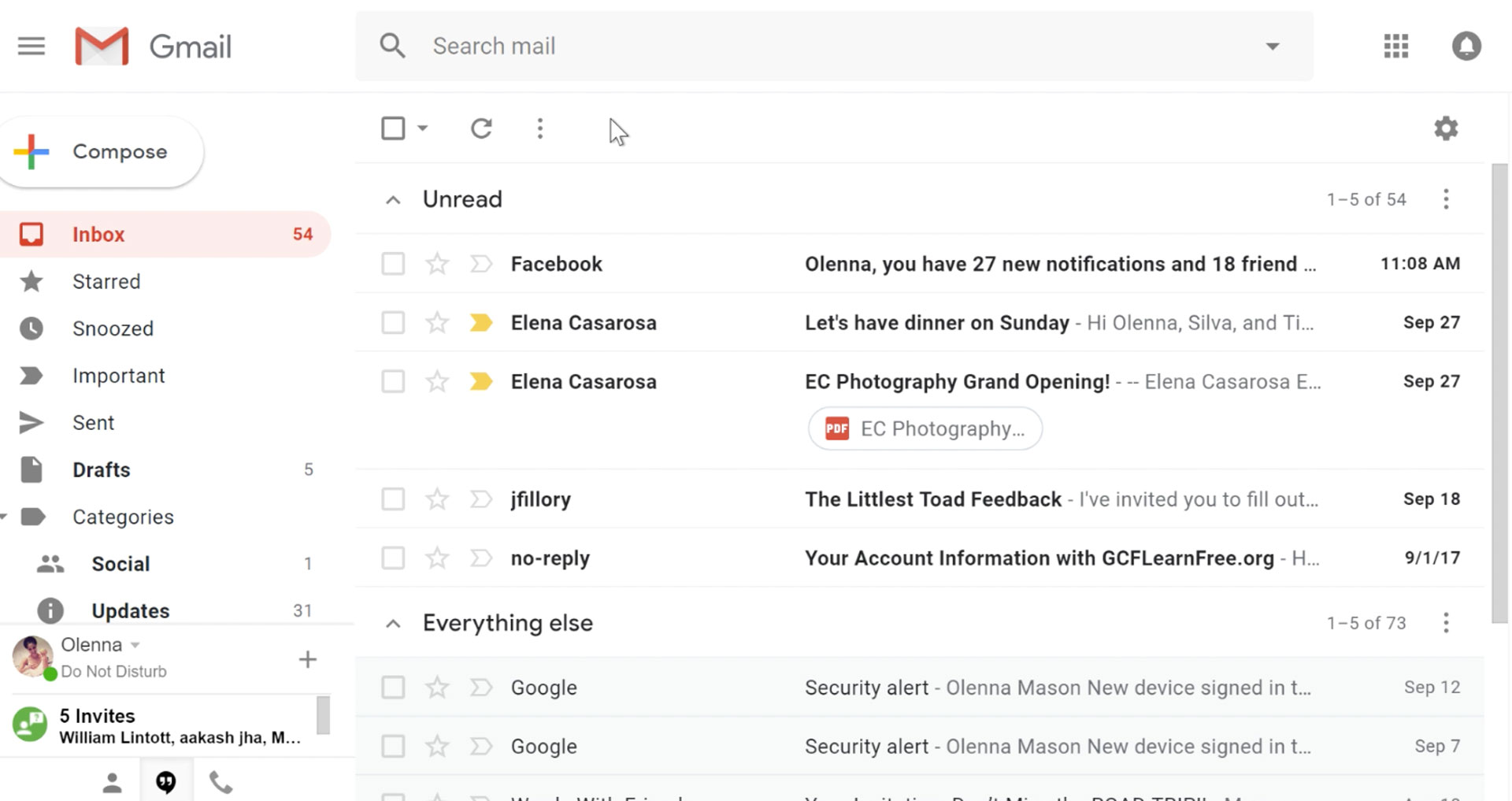 It would be very difficult to even start a free eMail list without mentioning Google's Gmail. Introduced all the way back in 2004 as an invite-only service it became over time the most popular email platform largely due to the fact Google is offering free eMail accounts.
There are a lot of good things to be said about Gmail itself, most of the area is clutter-free and the largest space is reserved for eMail itself letting users focus on what is important. WEB client itself means that you do not need to have any application installed on your device, altho via Google chrome, you can use Gmail offline offering you flexibility if needed.
The ability to connect and manage other accounts like Outlook, Yahoo, etc is just making Gmail even more attractive, and the snooze feature is a really neat little detail that will pause eMail notifications if you need to focus on other things.
Lack of organizing messages into folders is a little confusing since Gmail offers its own unique label system but sometimes I need to have old reliable save eMail to folder.
All in all, Gmail is a great service and it offers a great eMail on the go experience.
It would be very difficult to even start a free eMail list without mentioning Google's Gmail. Introduced all the way back in 2004 as an invite-only service it became over time the most popular email platform largely due to the fact Google is offering free eMail accounts.
There are a lot of good things to be said about Gmail itself, most of the area is clutter-free and the largest space is reserved for eMail itself letting users focus on what is important. WEB client itself means that you do not need to have any application installed on your device, altho via Google chrome, you can use Gmail offline offering you flexibility if needed.
The ability to connect and manage other accounts like Outlook, Yahoo, etc is just making Gmail even more attractive, and the snooze feature is a really neat little detail that will pause eMail notifications if you need to focus on other things.
Lack of organizing messages into folders is a little confusing since Gmail offers its own unique label system but sometimes I need to have old reliable save eMail to folder.
All in all, Gmail is a great service and it offers a great eMail on the go experience.
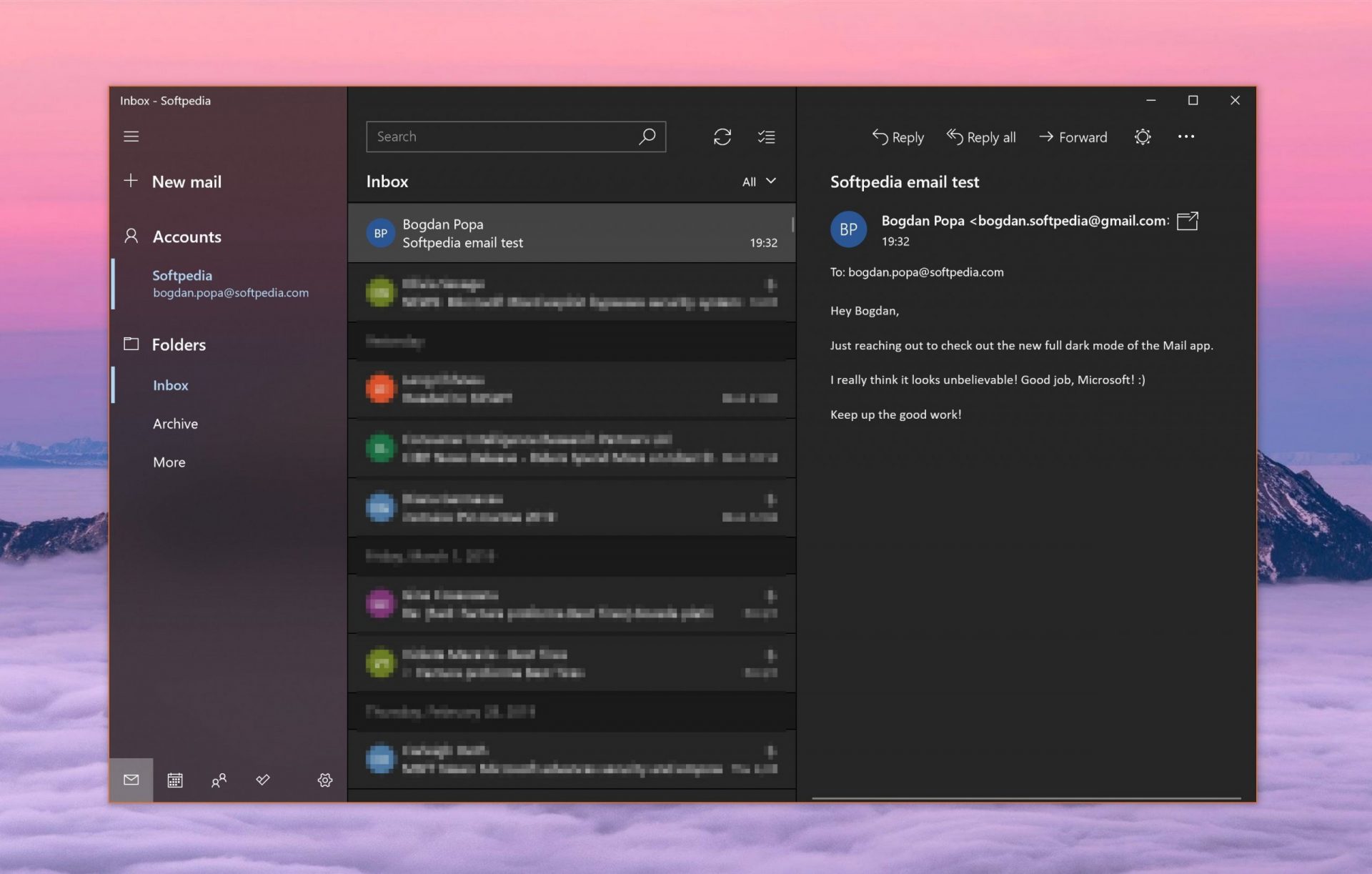 Free Windows eMail client simply called Mail is what was once outlook express. Mail itself has the ability to work with other popular accounts like Google Gmail account, Yahoo, iCloud etc. How it comes with Windows OS and it integrates very well with Microsoft Calendar, this eMail client is for many the first choice.
On the negative side, I might say this is a strip-down version of Outlook which is paid solution so some features are missing if we would compare the two.
Overall, a simple and nice eMail client worth your time, especially if you are on the Windows platform.
Free Windows eMail client simply called Mail is what was once outlook express. Mail itself has the ability to work with other popular accounts like Google Gmail account, Yahoo, iCloud etc. How it comes with Windows OS and it integrates very well with Microsoft Calendar, this eMail client is for many the first choice.
On the negative side, I might say this is a strip-down version of Outlook which is paid solution so some features are missing if we would compare the two.
Overall, a simple and nice eMail client worth your time, especially if you are on the Windows platform.
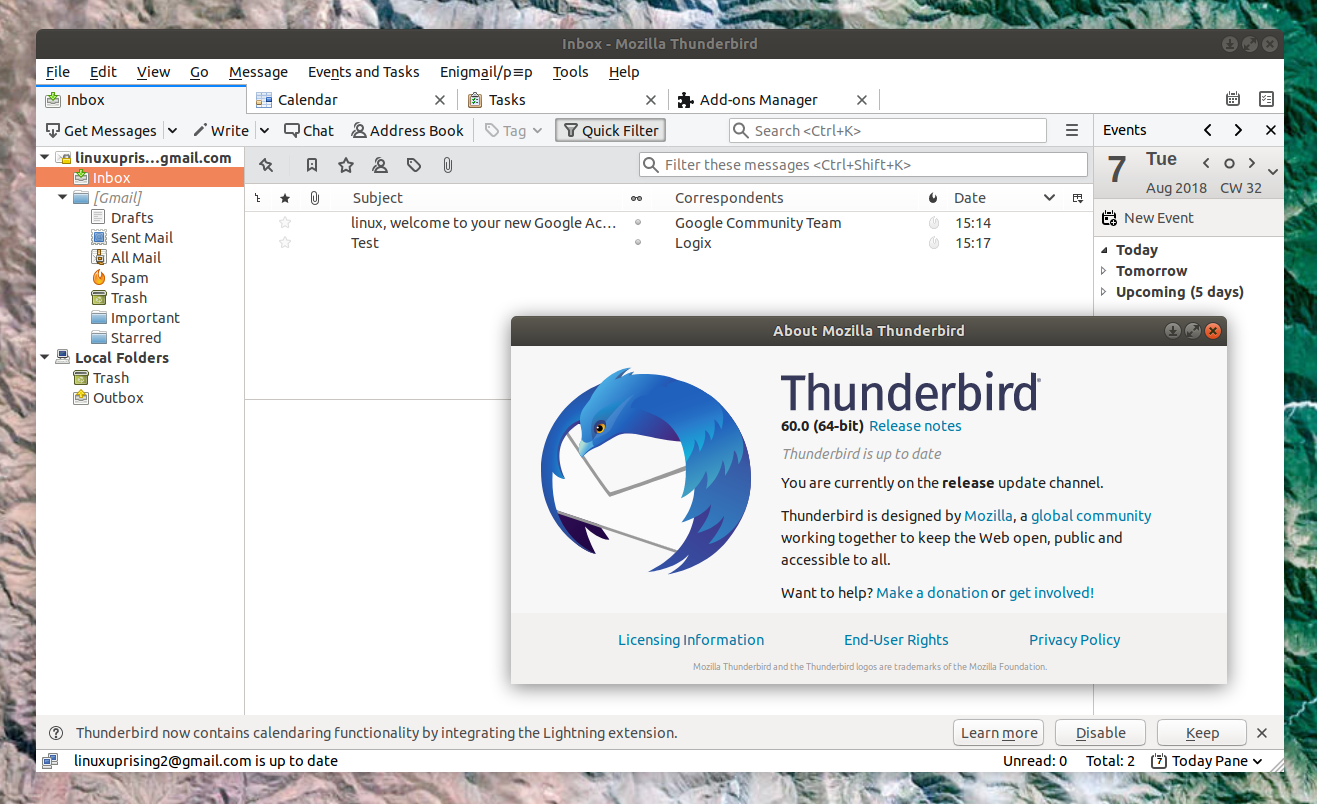 Great eMail client matching in functions against paid and premium solutions of big tech companies. Fueled with plenty of customization options and reskinning ones this eMail client offers a lot for its free price tag.
It is also fueled by Mozilla community focusing on privacy and security. It can work with any mail service and it is lightweight with a clean look, altho the look itself can be heavily customized.
The bad side is that client itself relies on email services to provide cloud-based emails, so if you are receiving your email via a service that does not have a cloud-based service in itself all of your received emails will be locked to the computer where you have received them. Also customizing it can be sometimes a little too technical for the average computer user.
All in all, Thunderbird is one great eMail client and it would be a shame not to use it because of its technical side, if you need a reliable and secure eMail client on a single machine, look no further than Thunderbird.
Great eMail client matching in functions against paid and premium solutions of big tech companies. Fueled with plenty of customization options and reskinning ones this eMail client offers a lot for its free price tag.
It is also fueled by Mozilla community focusing on privacy and security. It can work with any mail service and it is lightweight with a clean look, altho the look itself can be heavily customized.
The bad side is that client itself relies on email services to provide cloud-based emails, so if you are receiving your email via a service that does not have a cloud-based service in itself all of your received emails will be locked to the computer where you have received them. Also customizing it can be sometimes a little too technical for the average computer user.
All in all, Thunderbird is one great eMail client and it would be a shame not to use it because of its technical side, if you need a reliable and secure eMail client on a single machine, look no further than Thunderbird.
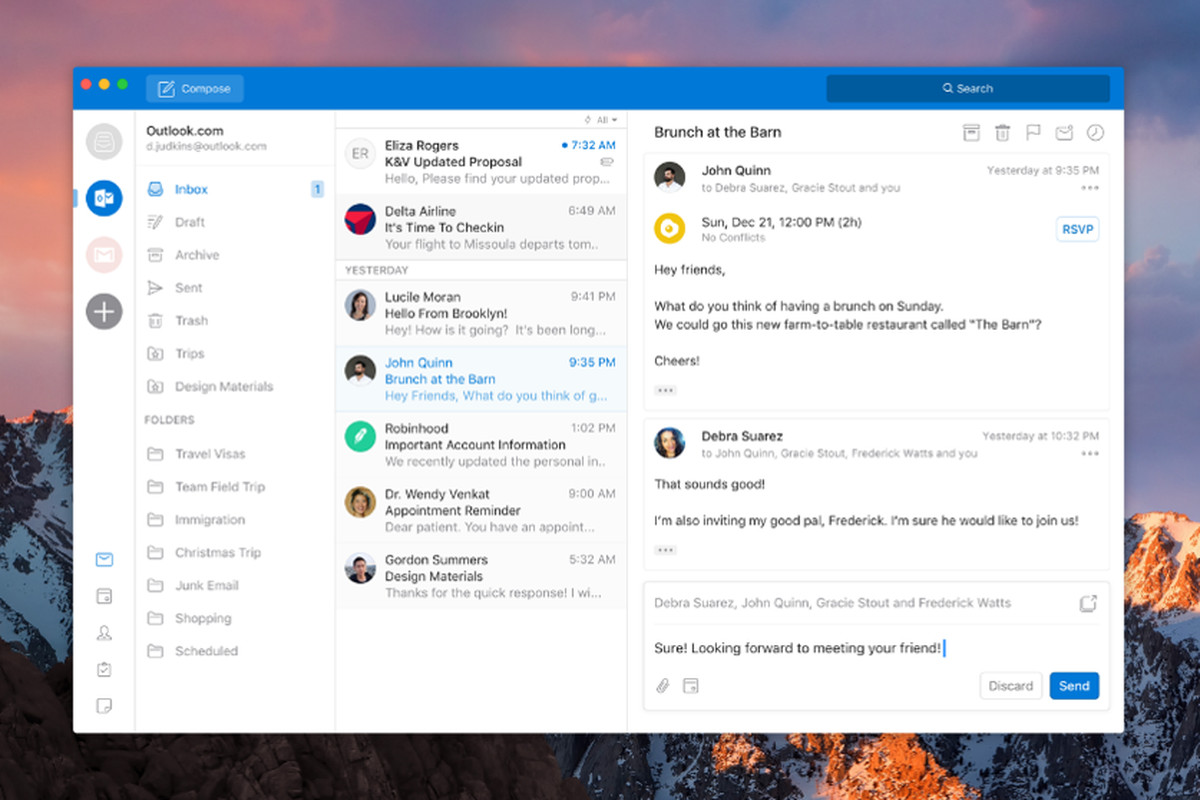 Outlook comes as a part of the Microsoft Office suite and as one of the oldest eMail clients, it is still widely popular and adopted through many users and businesses. It has tight integration with all Microsoft services and full integration with Calendar making it one of the if not the best eMail client out there.
Outlook also has a free online service completely free for personal use as well.
The downside is that you can not get it as a separate product if you want a business version other than as a part of the Office suite.
The final verdict would be that this is perhaps the best eMail client out but the big downside is that there is no desktop version outside the Office suite.
Outlook comes as a part of the Microsoft Office suite and as one of the oldest eMail clients, it is still widely popular and adopted through many users and businesses. It has tight integration with all Microsoft services and full integration with Calendar making it one of the if not the best eMail client out there.
Outlook also has a free online service completely free for personal use as well.
The downside is that you can not get it as a separate product if you want a business version other than as a part of the Office suite.
The final verdict would be that this is perhaps the best eMail client out but the big downside is that there is no desktop version outside the Office suite.
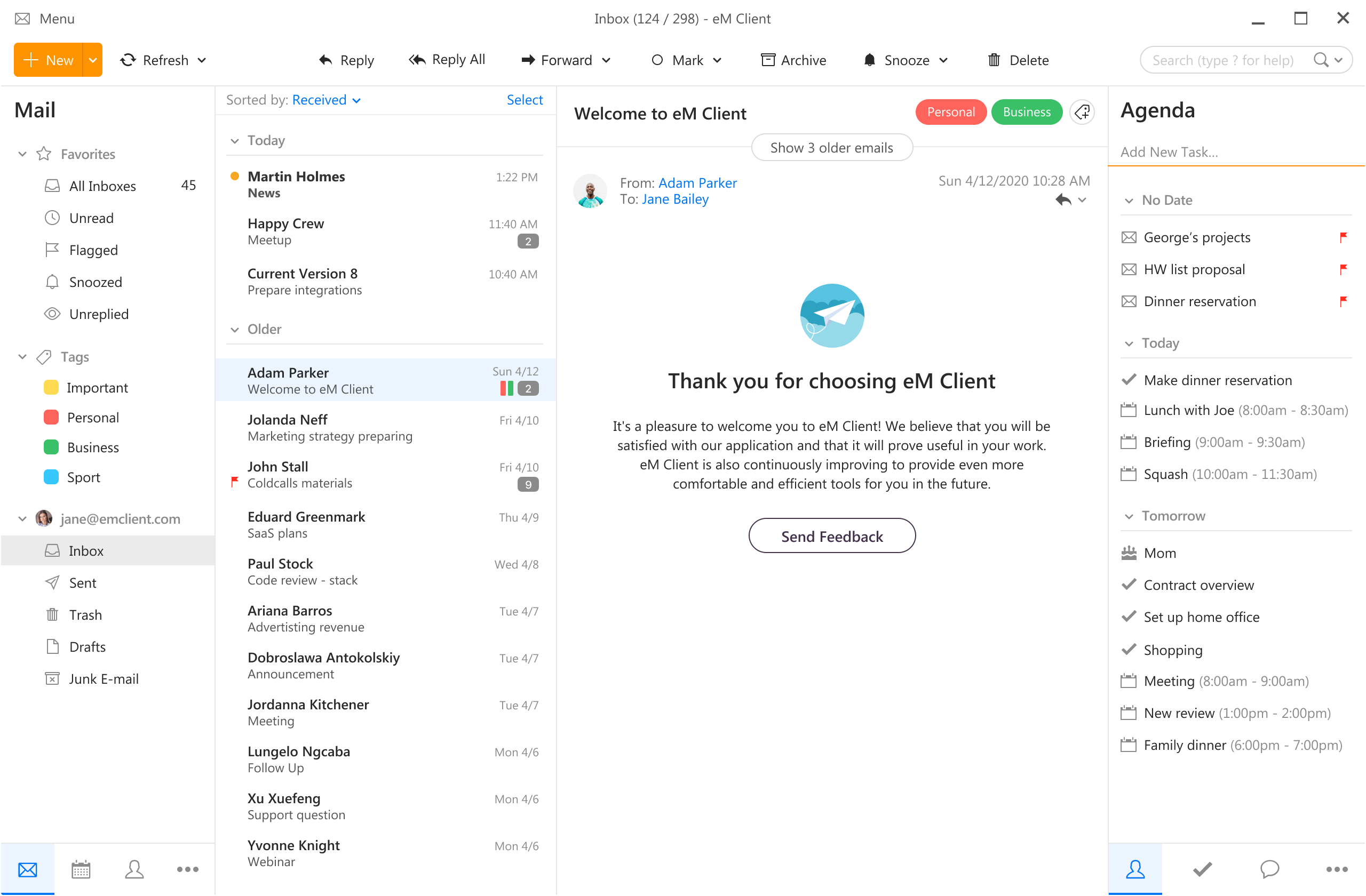 eM Client offers a wide array of features, including a calendar, contacts, and chat. Support is provided for all the major email services including Gmail, Yahoo, iCloud, and Outlook.com. The latest version also offers PGP encryption, live backup, basic image editing capabilities, and auto-replies for Gmail.
Its automatic system makes it very easy to get emails from other services since there is no manual setting, all that is needed is to type in your email and eM Client will do everything else automatically.
A one-time purchase is not pricy and it could offer some features that some free clients are missing. Go check it out with a free trial and see if it is for you.
eM Client offers a wide array of features, including a calendar, contacts, and chat. Support is provided for all the major email services including Gmail, Yahoo, iCloud, and Outlook.com. The latest version also offers PGP encryption, live backup, basic image editing capabilities, and auto-replies for Gmail.
Its automatic system makes it very easy to get emails from other services since there is no manual setting, all that is needed is to type in your email and eM Client will do everything else automatically.
A one-time purchase is not pricy and it could offer some features that some free clients are missing. Go check it out with a free trial and see if it is for you.
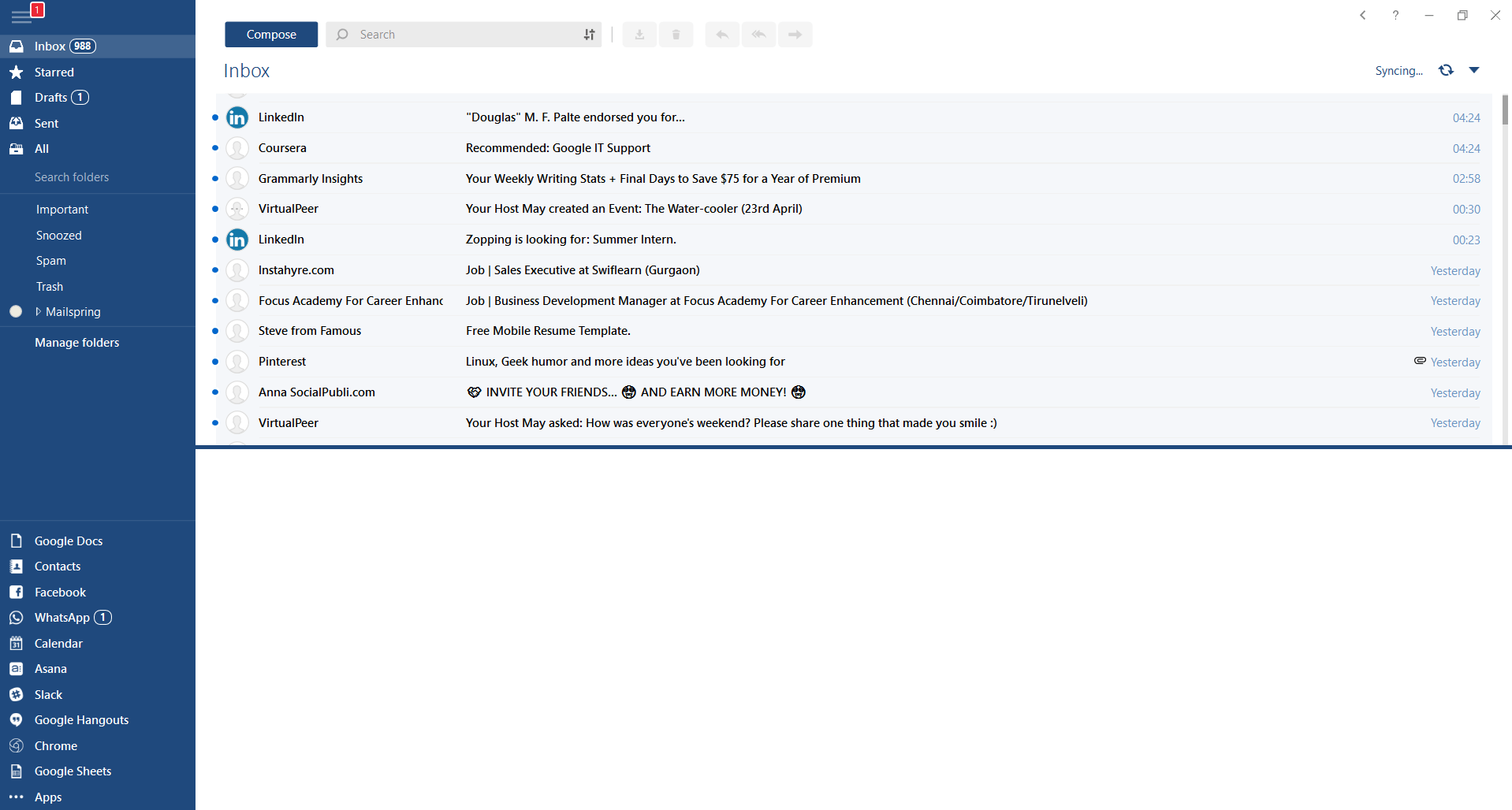 This eMail client's main focus is the simplicity of use with visual appeal while tackling multiple eMail accounts. It has many built-in apps along with a customizable interface. Unlike some more Microsoft-centric email clients, Mailbird Business supports a diverse range of integrated apps, including WhatsApp, Google Docs, Google Calendar, Facebook, Twitter, Dropbox, and Slack, all making for a better-streamlined workflow.
The downside of this client is the yearly subscription plan. I think people, in general, want to get away from software subscription plans so I will include this as a downside but bear in mind it is downside just in terms of a business plan not in the client itself.
This eMail client's main focus is the simplicity of use with visual appeal while tackling multiple eMail accounts. It has many built-in apps along with a customizable interface. Unlike some more Microsoft-centric email clients, Mailbird Business supports a diverse range of integrated apps, including WhatsApp, Google Docs, Google Calendar, Facebook, Twitter, Dropbox, and Slack, all making for a better-streamlined workflow.
The downside of this client is the yearly subscription plan. I think people, in general, want to get away from software subscription plans so I will include this as a downside but bear in mind it is downside just in terms of a business plan not in the client itself.
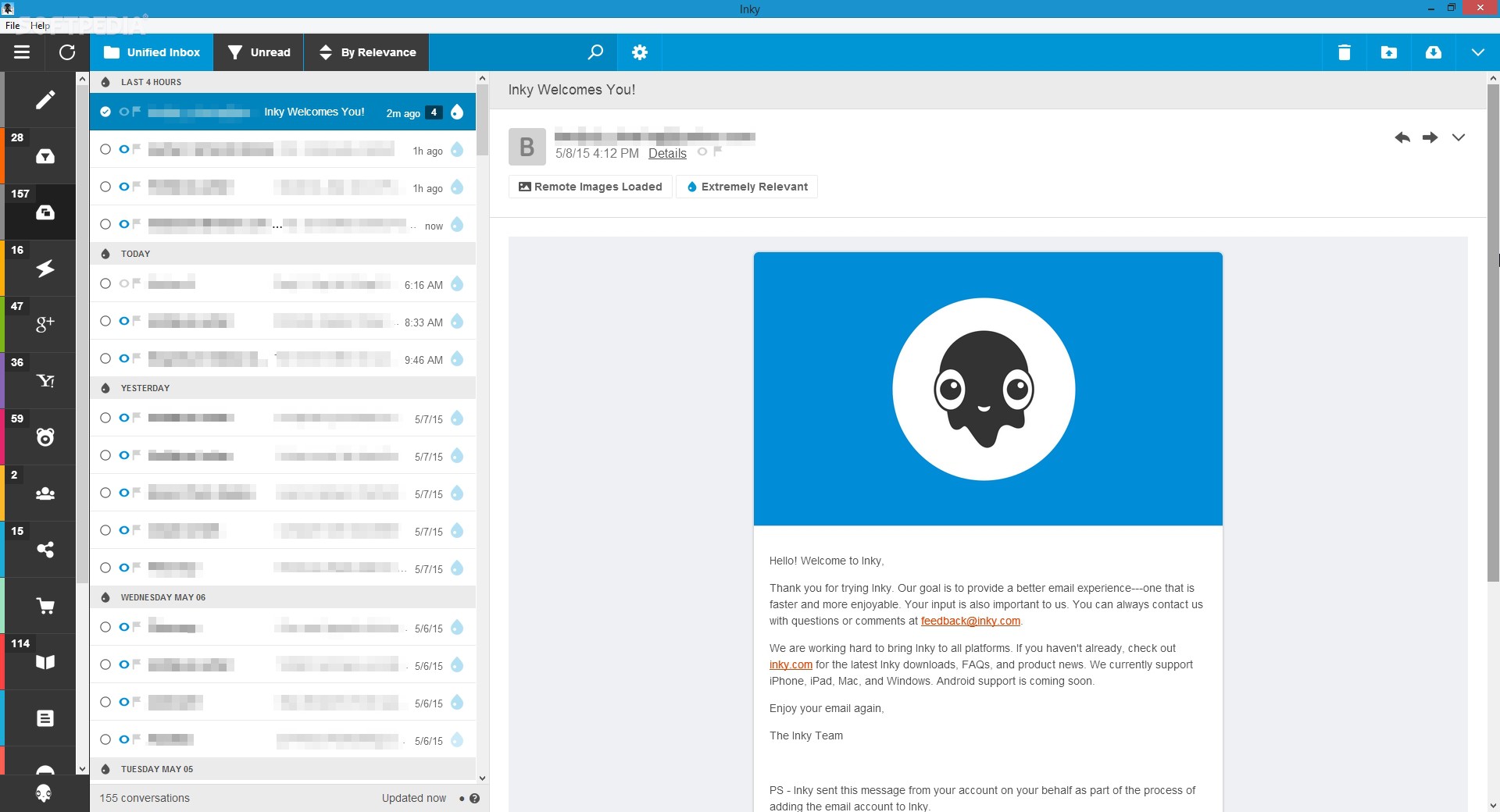 Inky is eMail client if you are looking for security. It uses AI along with machine learning in order to block all types of phishing attacks that can get through to other clients. The proprietary machine learning technology can literally read an email to determine if it has phishing content, and then is able to quarantine the email or deliver it with the malicious links disabled. It also takes things a step further and offers an analytics dashboard, which allows an administrator to see patterns of attacks based on dates, or targeted users.
The downside is that client itself is so much focused on security that sometimes some nonsecurity features get overlooked and provide a poor experience but if you need a good and greatly secured eMail client Inky is one to check out.
Inky is eMail client if you are looking for security. It uses AI along with machine learning in order to block all types of phishing attacks that can get through to other clients. The proprietary machine learning technology can literally read an email to determine if it has phishing content, and then is able to quarantine the email or deliver it with the malicious links disabled. It also takes things a step further and offers an analytics dashboard, which allows an administrator to see patterns of attacks based on dates, or targeted users.
The downside is that client itself is so much focused on security that sometimes some nonsecurity features get overlooked and provide a poor experience but if you need a good and greatly secured eMail client Inky is one to check out. 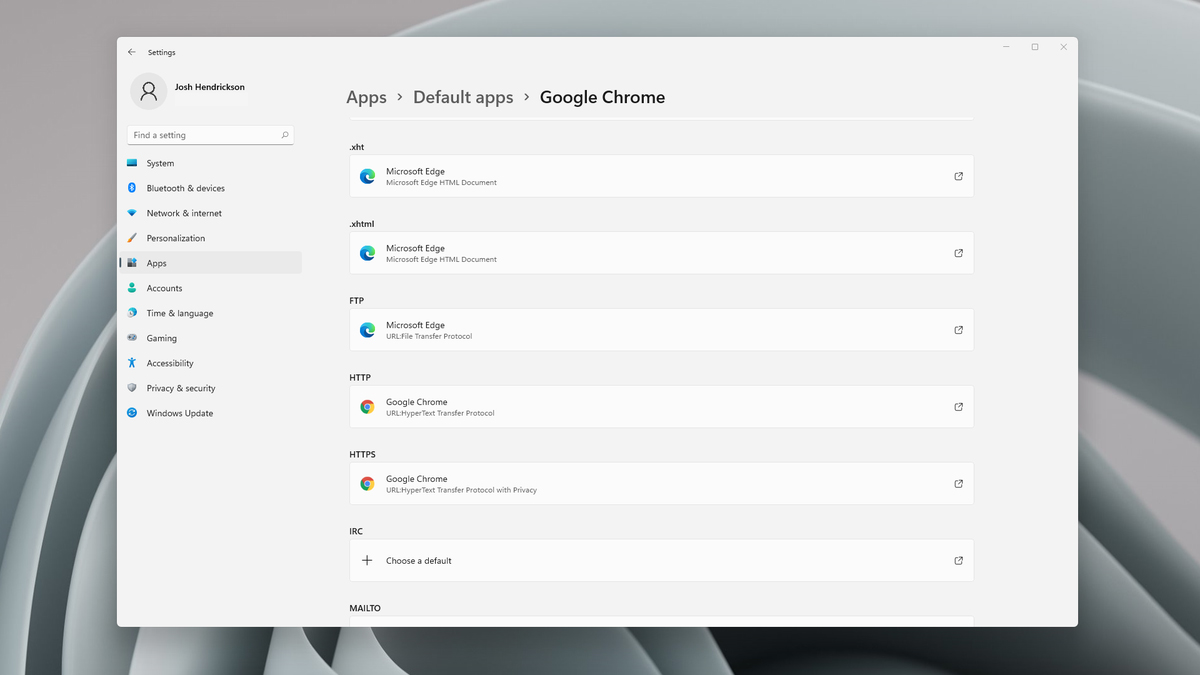 Choosing default browser in settings
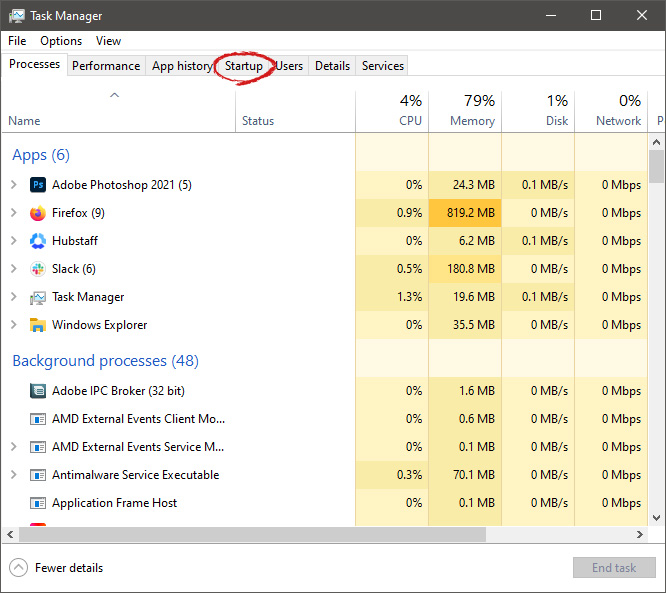
 When Task Manager opens, click on the startup tab on top.
 Once you click on startup you will get a list of applications that are set to be started when Windows is booted.
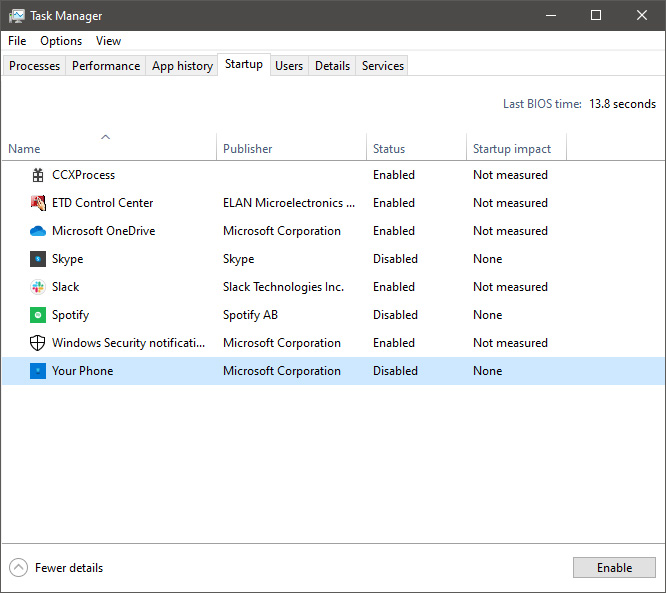 You can now click on the application and then click on disable on the bottom button, the application status will update in task manager to disabled and it will not be booted anymore when Windows starts. In this same manner, you can enable back some applications if you changed your mind about them.
Please note that some applications are using some services and must have them running or they will not work properly. The best practice is to disable applications you are positive you will not use or use rarely so you do not want them to slow down Windows.
You can now click on the application and then click on disable on the bottom button, the application status will update in task manager to disabled and it will not be booted anymore when Windows starts. In this same manner, you can enable back some applications if you changed your mind about them.
Please note that some applications are using some services and must have them running or they will not work properly. The best practice is to disable applications you are positive you will not use or use rarely so you do not want them to slow down Windows. 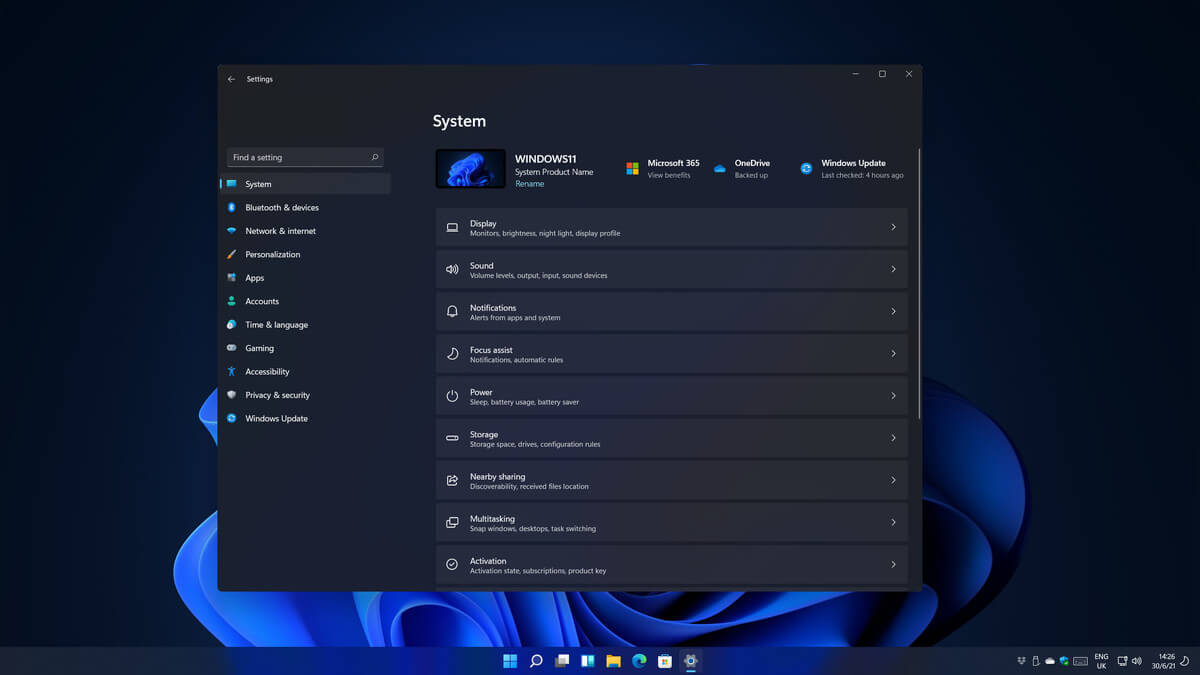 Same as Windows 10, Windows 11 also keeps track of date and time using an internet time server. But in a case that you need to change the date or time for any kind of reason here is a guide for that process:
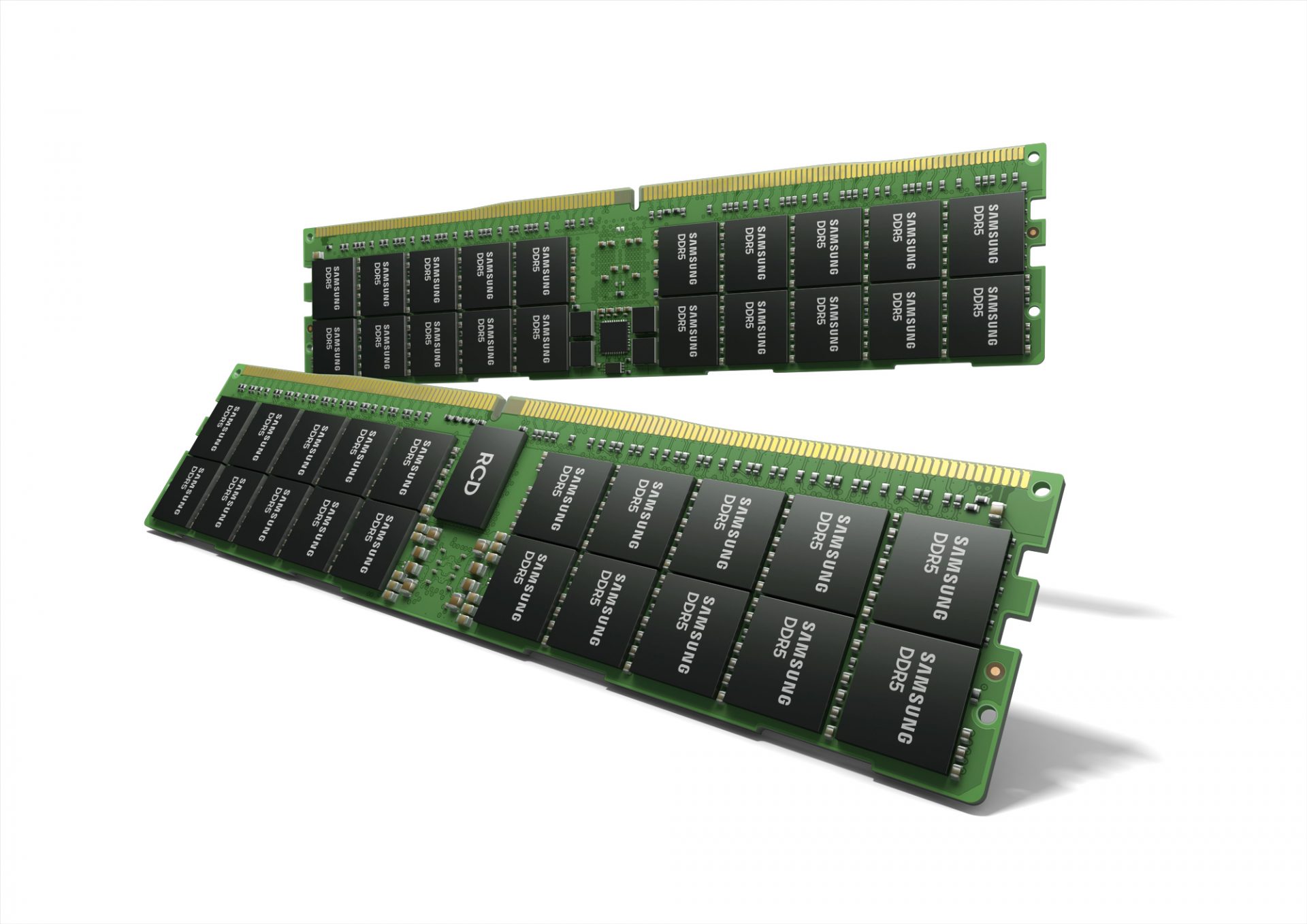 Next-generation of RAM, DDR5 supposed to hit shelves around late summer or fall in 2021if everything goes as planned.
Its goal is to increase speed and efficiency, wants to pack more memory in a single stick, and have better power management.
Next-generation of RAM, DDR5 supposed to hit shelves around late summer or fall in 2021if everything goes as planned.
Its goal is to increase speed and efficiency, wants to pack more memory in a single stick, and have better power management.
